Showing posts with label JavaScript. Show all posts

Sunday, 28 August 2016

JavaScript Selection Statements(if, if...else, switch)

Selection Statement
Allows the execution of one or group of statements on particular condition.
Selection statements use a condition to select or determine the statements that are to be executed.

Selection Statements are of three types
  • if
  • if..else
  • switch
if Statement
It is used when we need to execute a group of one or more statements only when a particular condition is met.
Example

<!DOCTYPE html>
<html>
<head>
    <title>javaScript if Statement</title>
</head>
<body>
    <h1>JavaScript if Statement</h1>
    <script>
        var number1 = 4;
        var number2 = 8;
        if ((number2 / number1 == 2))
        {
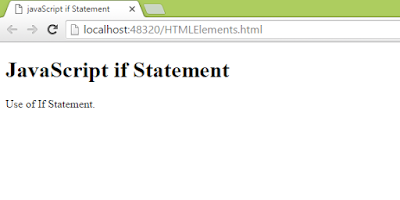
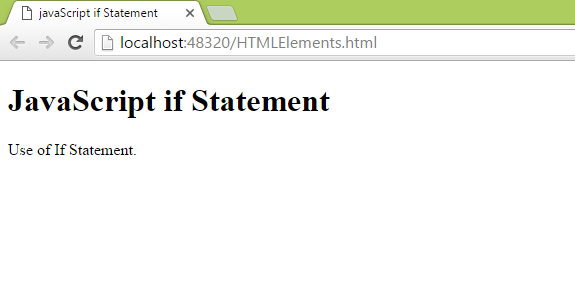
            document.write("Use of If Statement.<br />");
        }
    </script>
</body>
</html>

if...else Statement
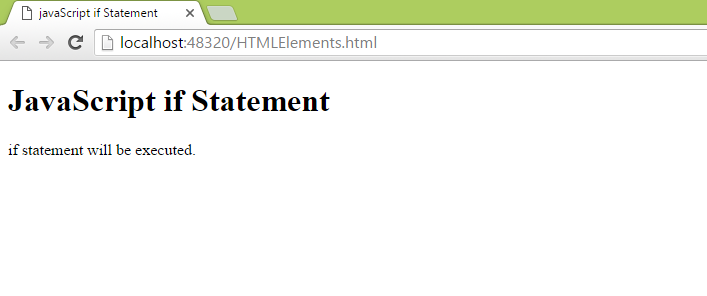
If we want to execute another set of statements when condition is not true than we can use if...else statement.
Example 1

<!DOCTYPE html>
<html>
<head>
    <title>javaScript if Statement</title>
</head>
<body>
    <h1>JavaScript if Statement</h1>
    <script>
        var number1 = 4;
        var number2 = 8;
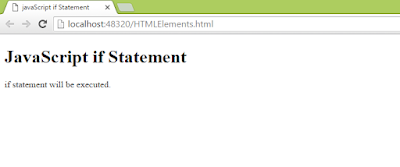
        if ((number2 / number1 == 2)) {
            document.write("if statement will be executed.<br />");
        }
        else {
            document.write("else statement will be executed.<br />");
        }
    </script>
</body>
</html>
Example 2
<!DOCTYPE html>
<html>
<head>
    <title>javaScript if Statement</title>
</head>
<body>
    <h1>JavaScript if Statement</h1>
    <script>
        var number1 = 4;
        var number2 = 8;
        if ((number2 / number1 == 3)) {
            document.write("if statement will be executed.<br />");
        }
        else {
            document.write("else statement will be executed.<br />");
        }
    </script>
</body>
</html>


Example 3

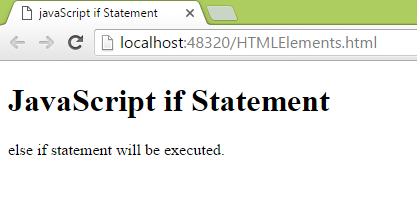
<!DOCTYPE html>
<html>
<head>
    <title>javaScript if Statement</title>
</head>
<body>
    <h1>JavaScript if Statement</h1>
    <script>
        var number1 = 4;
        var number2 = 8;
        if ((number2 / number1 == 3)) {
            document.write("if statement will be executed.<br />");
        }
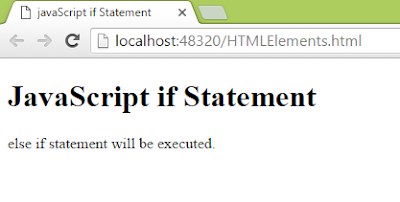
        else if ((number2 / number1 == 2)) {
            document.write("else if statement will be executed.<br />");
        }
        else {
            document.write("else statement will be executed.<br />");
        }
    </script>
</body>
</html>

switch Statement
statement will be executed on the basis of a numeric or string expression. If none of the condition met than default condition will be executed.
Syntax
switch(expression)
{
case value1 : statement1;
                   break;
case value2 : statement2;
                   break;
default : statement_default;
             break;
}
Example 1: When break is not used. all the statements after the correct case will be executed.

<!DOCTYPE html>
<html>
<head>
    <title>javaScript Switch Statement</title>
</head>
<body>
    <h1>JavaScript Switch Statement</h1>
    <script>
        var number1 = 4;
        var number2 = 8;
        switch (number2 / number1)
        {
            case 1: document.write("( 8/4 ) = 1.<br />");
            case 2: document.write("( 8/4 ) = 2.<br />");
            case 3: document.write("( 8/4 ) = 3.<br />");
            default:
                document.write("Result not found");
        }
    </script>
</body>
</html>

Example 2
<!DOCTYPE html>
<html>
<head>
    <title>javaScript Switch Statement</title>
</head>
<body>
    <h1>JavaScript Switch Statement</h1>
    <script>
        var number1 = 4;
        var number2 = 8;
        switch (number2 / number1)
        {
            case 1: document.write("( 8/4 ) = 1.<br />");
                break;
            case 2: document.write("( 8/4 ) = 2.<br />");
                break;
            case 3: document.write("( 8/4 ) = 3.<br />");
                break;
            default:
                document.write("Result not found");
        }
    </script>
</body>
</html>


Features of JavaScript, syntax

JavaScript
It is a client and server side object based scripting language that is used to make interactive web pages. JavaScript is commonly used scripting language because it is written on the client side executes on the client browser, thereby reducing the load on the server.
It is lightweight programming language.
Javascript is interpreted language, which implies that scripts written in JavaScript are interpreted line by line, which is built in component of web browser.
Javascript is platform independent, means that you need to write the script once and can run it on any platform or browser without affecting the output of the script.

Features of JavaScript

  • Imperative and structured - implies that javascript supports all the syntaxes of the structured programming language C, such as if statement, loops, switch. The only difference in between c and javascript is that, semicolon is not necessary to terminate the statement in javascript while it does in C.
  • Dynamic Text - implies that javascript supports dynamic typing. this means that type of variable defined according to the value stored in it.example, after variable declaration we assign it some value that's dynamic typing. Javascript provides some built in objects such as Math, String etc.
  • Functional - implies that javascript does not support classes. Instead  objects are created from the constructor function. each constructor function represent a unique object type.
  • Prototype-based - each javascript function is associated with a prototype object. there are several built in objects that represents constructor functions, like Array(), Date(), Error(), Math(), Number() etc.
  • Platform independent -  means that you need to write the script once and can run it on any platform or browser without affecting the output of the script.
Example 1: When javascript is present inside head.

<!DOCTYPE html>
<html>
<head>
    <title>Css begins</title>
    <style>
        li {
        font-weight:bold;
        font-style:italic;
        }
    </style>
    <script>
        alert("Javascript Begins");
    </script>
</head>
<body>

    <ul style="border:double; color:black; font-weight:bold; width:100px">
        <li><a class="active" href="#home">Home</a></li>
        <li><a href="#news">News</a></li>
        <li><a href="#contact">Contact</a></li>
        <li><a href="#about">About</a></li>
    </ul>

</body>
</html>

Example 2: Javascript at bottom
<!DOCTYPE html>
<html>
<head>
    <title>Css begins</title>
    <style>
        li {
        font-weight:bold;
        font-style:italic;
        }
    </style>
</head>
<body>

    <ul style="border:double; color:black; font-weight:bold; width:100px">
        <li><a class="active" href="#home">Home</a></li>
        <li><a href="#news">News</a></li>
        <li><a href="#contact">Contact</a></li>
        <li><a href="#about">About</a></li>
    </ul>
    <script>
        alert("Javascript Begins");
    </script>
</body>
</html>

In the example first when javascript is present at top. It is loaded first before the elements of the webpage. While in Example second first element are loaded than javascript.
It's best practice to include css at the top and javascript at the bottom. it saves your loading time.
If it's really important like some elements depends on javscript than we need to include that javascript code at the top. 

Sunday, 21 August 2016

JavaScript Math and Date Object

The Math object
It is used to perform arithmetic operations.

Properties of Math object
Properties
Description
E
Holds Euler’s number whose approximate value is 2.718
LN2
Holds natural logarithm of 2, whose approximate value is 0.693
LN10
Holds natural logarithm of 10, whose approximate value is 2.302
LOG2E
Holds the base-2 logarithm of E, whose approximate value is 1.442
LOG10E
Holds the base-10 logarithm of E, whose approximate value is 0.434
PI                
Holds the numeric value of PI, whose approximate value is 0.707
SQRT1_2
Holds the square root of ½, whose approximate value is 0.707
SQRT2
Holds the square root of 2, whose approximate value is 1.414

Methods of the Math object
Method
Description
abs(x)
Returns the absolute value of x
acos(x)
Returns arccosine(in radian) of x
asin(x)
Returns arcsine(in radian) of x
atan(x)
Returns the arctangent of x with numeric value between –PI/2 and PI/2 radians
atan2(y,x)
Returns the arctangent of the quotation on dividing y and x
ceil(x)
Round up x to the nearest bigger integer
cos(x)
Returns cosine value of x
exp(x)
Returns the value of ex
floor(x)
Rounds up x to the nearest smaller integer
log(x)
Returns the natural logarithm value of x
max(x,y,z,…,n)
Returns the highest number from the given list
min(x,y,z,…,n)
Returns the lowest number from the given list
pow(x,y)
Returns x to the power of y
random()
Returns a random number between 0 and 1
round()
Rounds up x to the nearest integer
sin(x)
Returns sine value of x
sqrt(x)
Returns the square root of x
tan(x)
Returns the tangent value of x


 Example
<!DOCTYPE html>
<html>
<head>
    <title>JavaScript Math Object</title>
</head>
<body>
    <h1>JavaScript Math Object</h1>
    <script>
        document.write('Floor: ' + Math.floor(11.456) + '<br/>');
        document.write('Ceil: ' + Math.ceil(11.456) + '<br/>');
        document.write('Log: ' + Math.log(11.456) + '<br/>');
        document.write('Max: ' + Math.max(11.456,12,56,1,-78) + '<br/>');
        document.write('Min: ' + Math.min(11.456, -87, 78, 34) + '<br/>');
        document.write('Power: ' + Math.pow(14,2) + '<br/>');
        document.write('random: ' + Math.random() + '<br/>');
        document.write('round: ' + Math.round(11.456) + '<br/>');
        document.write('sin: ' + Math.sin(60) + '<br/>');
        document.write('tan: ' + Math.tan(45) + '<br/>');
        document.write('exp: ' + Math.exp(6) + '<br/>');
    </script>
</body>
</html>


The Date object
It is used to display a date on a web page or a timestamp in numerical or mathematical calculation.
The Date object can represents dates 285616 years before or after January 1, 1970.
var date1=new Date(); or var date1= new Date(milliseconds);
or var date1= new Date(yyyy, mm , dd [, hr , min, sec, millisec]); or
var date1= new Date(“mm dd, yyyy”); or var date1= new Date(“mm dd, yyyy hr:min:sec”);

Properties of the Date object

Properties
Description
constructor
Holds the value of constructor function that has created the object
prototype
Adds properties and methods to the Date object

Methods of the Date Object

Methods
Description
getDate()
Returns the day of the month that ranges from 1 to 31
getDay()
Returns the numeric equivalence of the day of a week that is 0 to 6. 0 for Monday and 6 for Sunday
getFullYear()
Returns the numerical equivalence of year in four digit
getHours()
Return the hours which ranges from 0 to 23
getMilliseconds()
Returns the milliseconds that ranges from 0 to 999
getMinutes()
Returns minutes that ranges from 0 to 59
getMonth()
Returns numerical equivalence of month that ranges from 0 to 11
getSeconds()
Returns the seconds that ranges from 0 to 59
getTime()
Returns number of milliseconds since midnight jan1,1970
getTimezoneOffset()
Returns the difference of time (in minutes) between the Greenwich mean time(GMT) and the local time
getUTCDate()
Returns the day of the month that ranges from 1 to 31 as per the universal time
getUTCDay()
Returns the numeric equivalence of the day of a week that is 0 to 6. 0 for Monday and 6 for Sunday as per the universal time
getUTCFullYear()
Returns the numerical equivalence of year in four digit as per the universal time
getUTCHours()
Return the hours which ranges from 0 to 23 as per the universal time
getUTCMilliseconds()
Returns the milliseconds that ranges from 0 to 999 as per the universal time
getUTCMinutes()
Returns minutes that ranges from 0 to 59 as per the universal time
getUTCMonth()
Returns numerical equivalence of month that ranges from 0 to 11 as per the universal time
getUTCSeconds()
Returns the seconds that ranges from 0 to 59 as per the universal time
parse()
Parses a date string and returns the number of millisecond since the midnight of January 1,1970
setDate()
Sets the day of a month that ranges from 1 to 31
setFullYear()
Sets the year in four digits
setHours()
Sets the hours that ranges from 0 to 23
setMilliseconds()
Sets the milliseconds that ranges from 0 to 999
setMinutes()
Sets the minutes that ranges from 0 to 59
setMonth()
Sets the numerical equivalence of month that ranges from 0 to 11
setSeconds()
Sets the seconds that ranges from 0 to 59
setTime()
Sets a date and time by adding or subtracting specified milliseconds to/from midnight January 1,1970
setUTCDate()
Sets the day of a month that ranges from 1 to 31 as per the universal time
setUTCFullYear()
Sets the year in four digits as per the universal time
setUTCHours()
Sets the hours that ranges from 0 to 23 as per the universal time
setUTCMilliseconds()
Sets the milliseconds that ranges from0 to 999 as per the universal time
setUTCMinutes()
Sets the minutes that ranges from 0 to 59 as per the universal time
setUTCMonth()
Sets the numerical equivalence of month that ranges from 0 to 11 as per the universal time
setUTCSeconds()
Sets the seconds that ranges from 0 to 59 as per the universal time
toDateString()
Converts date into string
toLocalDateString()
Converts date into string as per local conventions
toLocalTimeString()
Converts time into string as per local conventions
toLocalString()
Converts the date object into a string as per local convetions
toString()
Converts the date object into a string
toTimeStamp()
Converts time into a string
toUTCString()
Converts the date object into string as per the universal time
UTC()
Holds the number milliseconds since the midnight of January 1, 1970, as per the universal time
valueOf()
Returns the primitive value of the Date object.

Example
<!DOCTYPE html>
<html>
<head>
    <title>JavaScript Date Object</title>
</head>
<body>
    <h1>JavaScript Date Object</h1>
    <script>
        var date = new Date();
        document.write('Todays Date: ' + date.getDate() + '/' + (date.getMonth() + 1) + '/' + date.getFullYear() + '<br/>');
        document.write('Time Is: ' + date.getHours() + '/' + (date.getMinutes() + 1) + '/' + date.getSeconds() + '<br/>');

    </script>
</body>
</html>